
Good news: you probably own almost everything already. Ten minutes of setup before your first lesson makes every lesson after it smoother.
The essentials
- Your guitar, in tune, with a clip-on tuner or a tuner app.
- A phone, tablet or laptop with a camera. A laptop or tablet is easier to see than a phone.
- A stable internet connection. Pause big downloads during the lesson.
- A chair without arms, picks, a capo and anything your teacher sent.
- Headphones, if your teacher will play along with you.
Camera: let your teacher see both hands
- Turn the device sideways (landscape).
- Place it about one to one and a half metres away, at chest height.
- Angle it slightly towards your fretting hand, so the fretboard is visible.
- Put the light in front of you, not behind you.
- Use a stand or a pile of books; never hold the device.
Sound: stop the app cutting your guitar out
Video-calling apps are tuned for speech. Their noise suppression can make a guitar fade in and out, or cut sustained notes short. Look for a music setting: Zoom has “Original sound for musicians”, and in other apps you can usually turn noise suppression down or off. Test it in a short call with a friend before your first lesson.
Electric guitar
Put a small amp near the device at a low volume, or plug into an audio interface connected to the computer. Headphones stop the amp feeding back into the microphone.
Set up a practice space
- A chair without arms, so the guitar sits naturally.
- A stand for your music or tablet at eye level.
- The guitar on a stand, not in its case, so it is always ready.
- Tuner, picks, capo and a notebook within reach.
- Good light and a quiet corner.
Using the same space for lessons and practice makes practice a habit: sit down, and you are ready to play.
Before your first online lesson
- Do a test call to check camera and sound.
- Tune up and warm up five minutes early.
- Write down the songs you love and what you want to learn.
- Charge the device, close other apps and silence notifications.
What a good first lesson covers is in your first guitar lesson.
What if the connection drops?
Agree a plan with your teacher in advance: reconnect, switch to another app, or carry on by phone. Ask how lost time is made up; a fair teacher will have a clear answer (see cancellation policies).
Print the checklist below and tick it off before your first lesson. Ready to book? See online guitar lessons.
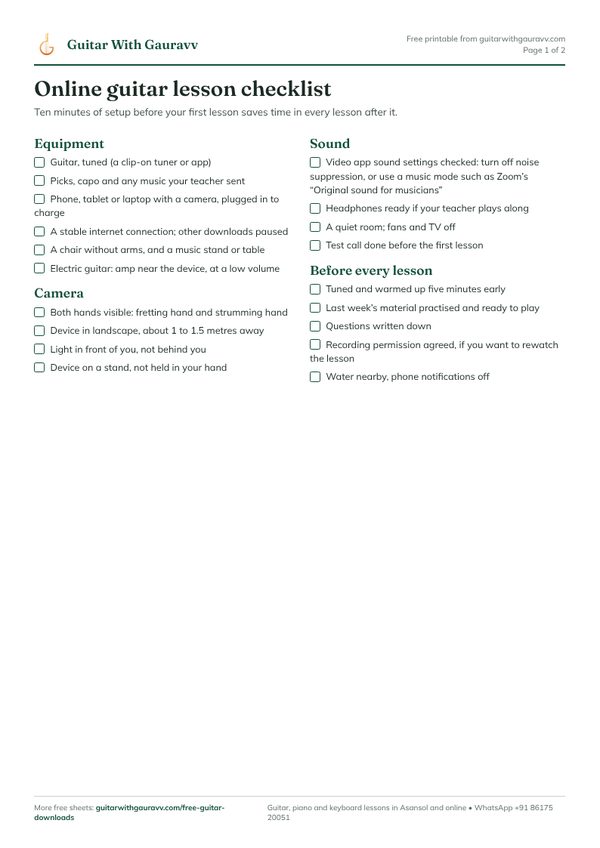
Free PDF
Online Guitar Lesson Checklist
Camera, sound and setup checks, questions to ask a new teacher, and lesson notes pages.